Complete Employee Time Tracking & Scheduling
ShiftTrek is your all-in-one solution for managing shifts, punctuality grace rules, automated shift capping, time tracking, and payroll reporting.
Explore All ShiftTrek Capabilities
Every feature built to streamline team management, attendance compliance, and labor operations.
Smart Shift Scheduling
Visual drag-and-drop schedule builder with draft vs published shift workflows, 1-click week copying, recurring templates, and overnight shift calculation.
Time Clock & Attendance
Live punch records with real-time states (In Progress, On Break, Completed). Accurate tracking of paid and unpaid meal/rest breaks.
Grace Periods & Shift Capping
Configurable late arrival and early departure grace windows (e.g. 15m). Automatic shift capping closes forgotten open timecards after allowed overtime buffers.
Excused Lates & Smart Punch Merging (Admin Superpower)
Wipe out unfair tardiness and accidental punch chaos. Employees submit self-service excuses with 1-click admin waivers, while our double-punch engine flags and unifies accidental split shifts to completely erase false early departure penalties.
Employee Request
From User Dashboard, click "Report Late Arrival" (advance) or "Request Excuse" on a late punch, select category (Traffic, Medical, Transit, Emergency), and submit.
Admin 1-Click Review
Admin clicks [Review Request ] right on the attendance row to inspect reason and approve.
Automatic Waiver
On approval, badge turns into
Excused Late +Xm, attendance penalty points are waived, and reports update 3-column totals (Unexcused + Excused = Total).
Automatic Detection
When an employee accidentally double-punches (e.g. 0m punch 8:14 AM - 8:14 AM followed by full shift 8:14 AM - 5:52 PM), the dashboard flags: Merge Shifts (Accidental Double-Punch Detected).
Preview & Confirm
Admin clicks Merge Shifts, inspects the side-by-side comparison, duration consolidation, and break transfer.
Zero False Penalties
Confirms merge → unified to 8:14 AM - 5:52 PM (On Time), duplicate is archived, and the false Early Departure: 9h 46m is completely erased!
Working Owner Mode
Dual-persona feature for owner-operators. Business owners can be scheduled on shifts, punch in via kiosk PIN, and track working hours without needing separate employee accounts.
Time-Off & Holiday Offsets
Full lifecycle leave management (Vacation, Sick, Personal, Unpaid). Paid company holidays automatically adjust shift start times so employees aren't marked late.
Reports & Late Spreadsheets
Real-time attendance overview, Monthly Late Calculation Spreadsheets, Absent & Unscheduled Reports, and 1-click CSV/Excel payroll exports.
Mobile Kiosk & Offline Sync
Shared tablet time clock with PIN entry, camera selfie verification to prevent buddy punching, and local queueing that syncs automatically when offline.
Clock-In Photo Audit Modal
Complete visual verification for shift punches. Kiosks and mobile apps capture front-facing facial photos and GPS coordinates. Admins inspect the multi-photo timeline (Clock-In, Clock-Out, Breaks) directly from the attendance table.
Multi-Branch Management
Manage multiple locations, distinct branch timezones, customizable departments, and granular permission roles for managers and staff.
Shift Cover & Swap Marketplace
Eliminate phone tag and manager bottlenecks. Employees broadcast open shifts to the team marketplace or propose direct 1-to-1 peer trades. A built-in conflict and overtime guard protects your payroll budget before 1-click manager approval.
Excused Lates & Smart Punch Merging Walkthrough
The Problem ShiftTrek Solves:
Unforeseen traffic bottlenecks, transit disruptions, and medical emergencies happen to good employees. Rigid attendance software marks them tardy and deducts penalty points without recourse. ShiftTrek introduces transparent Self-Service Excuse Requests with 1-Click Manager Waivers and dynamic 3-Way Report Columns.
Step 1: Employee Submits Excuse (Advance Notice or Retroactive)
Employees access the request modal directly from their dashboard via the "Report Late Arrival" banner or by clicking "Request Late Excuse" / "Request Early Excuse" next to any flagged punch on their attendance summary.
Step 2: Admin 1-Click Review on Attendance Dashboard
On the live Attendance Dashboard, pending excuse requests trigger an interactive badge. Admins inspect the employee's justification, add optional review notes, and click Approve or Reject.
| Employee | Date | Clock In | Clock Out | Action Required |
|---|---|---|---|---|
| Alex Morgan | May 7, 2026 | 8:35 AM Late +35m | 5:00 PM | [Review Request ] |
Step 3: Instant Waiver & 3-Way Transparent Reporting
The moment the excuse is approved, ShiftTrek transforms the row, zeroing out tardiness penalty points and maintaining an unassailable audit record across monthly matrices and payroll spreadsheets.
The Accidental Double-Punch Dilemma:
When a worker double-taps the punch button or kiosk tablet, standard time clocks create an instant 0-minute entry (e.g. 8:14 AM - 8:14 AM) followed by the actual shift (8:14 AM - 5:52 PM). Standard software calculates the first punch against the 6:00 PM scheduled finish and slaps the employee with an absurd Early Departure: 9h 46m penalty! ShiftTrek solves this with intelligent detection and side-by-side punch consolidation.
Step 1: Automatic Detection on Dashboard
ShiftTrek constantly audits same-day punch pairs for the same user. When an accidental double-punch occurs, the Attendance Dashboard highlights the anomaly and renders an instant action trigger:
Employee has 2 adjacent time records on this date: 0m accidental punch + full shift.
Step 2: Side-by-Side Merge Inspection & Break Consolidation
Clicking the merge button opens the live Side-by-Side comparator. Admins see the two conflicting punches, any meal/rest breaks, and the proposed unified timecard:
Punch: 8:14 AM - 8:14 AM
[Early Departure: 9h 46m]
Punch: 8:14 AM - 5:52 PM
[On Time, Shift Complete]
Unified In: 8:14 AM
Unified Out: 5:52 PM
Status: On Time, Early Departure Cleared
Meal & rest breaks automatically consolidated
Step 3: Zero False Penalties & Seamless Payroll Export
On confirm, ShiftTrek updates the primary record to 8:14 AM - 5:52 PM, transfers all break entries, safely soft-deletes the duplicate record with a full audit log (Merged by Admin), and completely wipes the false 9h 46m early departure penalty!
Highlights
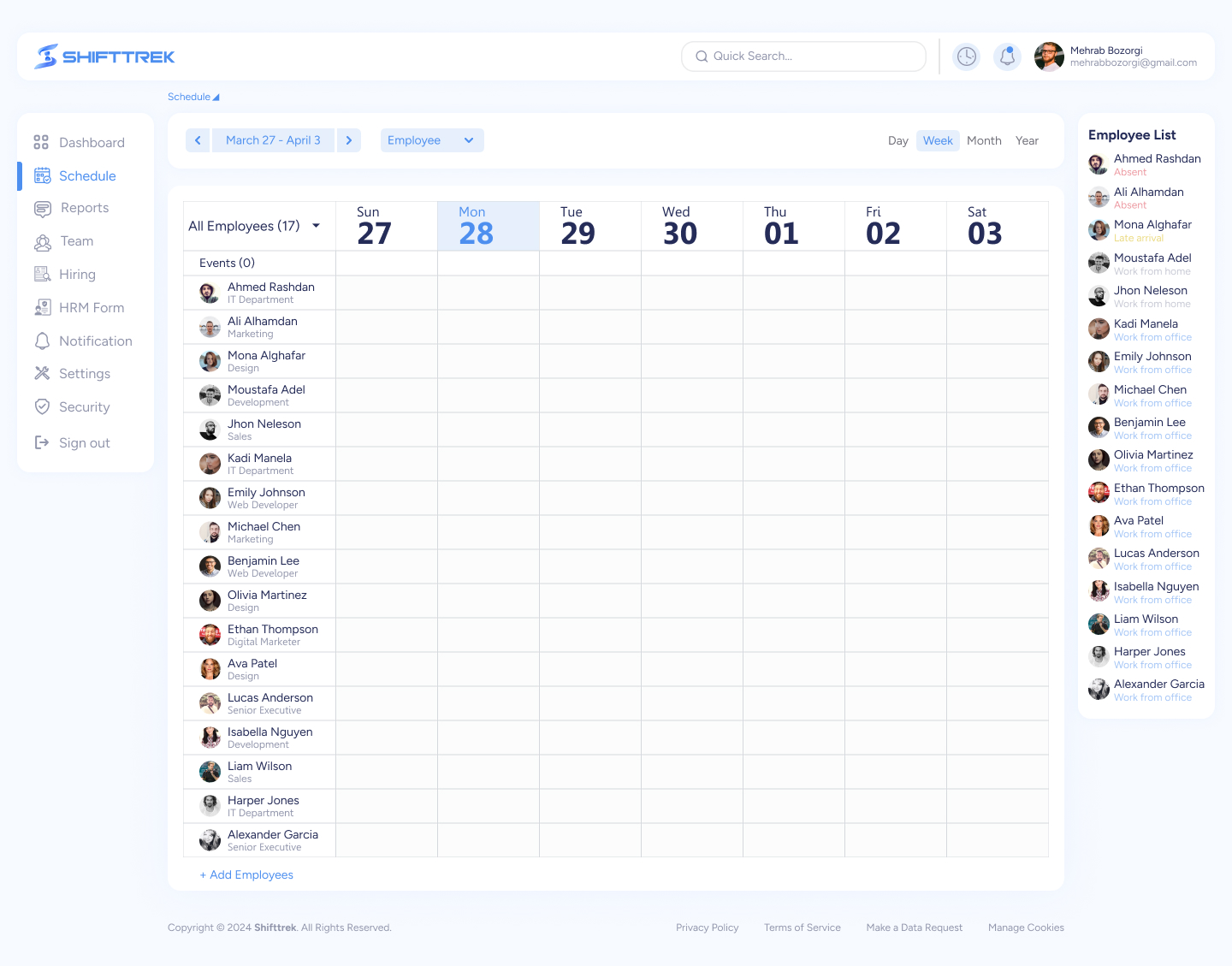
Schedule
Create and manage employee schedules with flexible time slots.Allow employees to view and request changes to their schedules. Automated conflict resolution for overlapping shifts.
Highlights
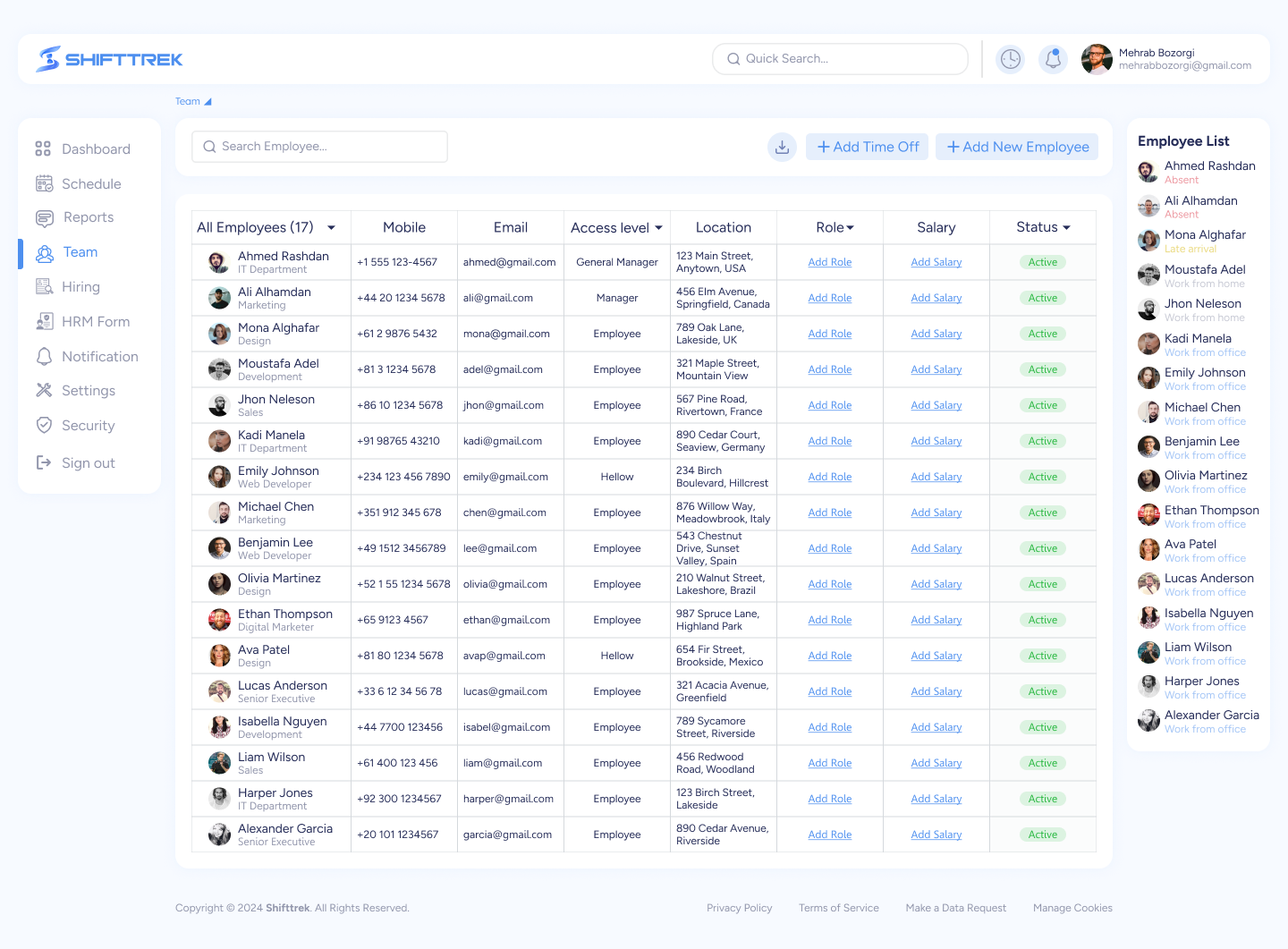
Team Management
Create and manage multiple teams within the organization. Assign team leaders and manage member roles and responsibilities. Real-time updates on team progress and performance.
Frequently Asked Questions
FAQ about all the company facilities and features provided by ShiftTrek
How do I add a new employee?
Go to the "Team" section and click "Add New Employee." Fill in the required details and assign them to a team or branch.
Can employees request time off?
Yes, employees can request time off through their dashboard. Managers will receive a notification to approve or reject the request.
How does the scheduling feature work?
Managers can create and assign schedules to employees. Employees can view their schedules in real-time and request changes if necessary.
What reports can I generate?
You can generate reports on employee attendance, performance, time off, and more, with customizable filters and also can export them.
ShiftTrek is a workforce management platform that streamlines employee time tracking, break management, and payroll automation, helping businesses save time and reduce payroll errors effortlessly.